10:19 AM – This is my first “unconference”. So far, we’ve had bagels and are now signing up/creating sessions for the day. It’s pretty chaotic, but that’s the beauty of it. Ken and I were thinking of doing this for a Rails Camp. Call it RuBarCamp or something.
lightbulb moment about iPhone and Safari for Windows ®
So, I watched the WWDC keynote, and I was like, “Why is Safari for Windows such a big deal that it is the ‘one last thing’ in Steve’s keynote?”
Well, it just hit me as I was reading this. Safari on Windows isn’t there to draw users to the Mac experience, it’s there so that people developing web apps for the iPhone have something to test with. The iPhone uses a “full version” of the Safari engine. Of course this needs to be tested, since each browser has its own quirks. There was no other way to test for safari than to buy a Mac. Until now.
Okay, now I can relax.
<EOL>
you never see Eden and Batman in the same room at the same time…
Of course, she’s only 2 days old, so that’s not saying much. Yes, this is a shameless plug to show off the baby 🙂

She kinda looks like a Peanuts © character, no?

What is daddy feeding me?

Sometimes, Eden is waaay too serious. I mean really, babies shouldn’t be worried about the merits of compiled languages vs. interpreted languages.

It’s the eyebrows, man.
<EOL>
holy small form factor, batman…
Back in 2002 or so, I became fascinated with small form factor computers. Those of you (okay, *both* of you) who have followed my blog for any time have probably noted this fascination.
There’s something about the shrinking size of all that computing power that really appeals to my geek-ness. I think it’s the possibilities that are opened up for putting powerful computers into more and more everyday things, like toasters, cars, appliances, etc. Or, it could be that the shrinking size of my living space has necessitated replacing all those huge, power-guzzling, noisy boxen of yore with svelte, silent, cool-running machines of the future.
Of course, Apple’s Mac mini is on my wishlist of small computers to add to my collection of small powerhouses, but today I read an article about the new pico-itx form factor designed by VIA, the leader in small form factor design. Prior to the availability of the Mac mini, VIA were the ones to watch in the SFF arena. The mini brought more features, slightly smaller size, and impeccable style to the table. To be honest, the offerings in SFF with regards to visual impact are pretty sorely lacking. I have found that Casetronic has the most attractive cases in the market, aside from Apple.
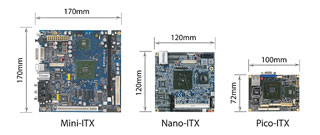 So the new Pico-ITX form factor reference design is targeted to consume about 1Watt of power under normal usage! Pretty amazing. This combined with RoHS compliance, I believe, are helping to push the industry toward lower and lower power consumption and better environmental impact.
Anyway, enough of my rambling.
saying goodbye to an old friend…
 Back in my college days (seems like ages ago now), I assembled my first PC. Ah, the memories. I hand-picked my components, trying to achieve the perfect balance of cheap, good, and fast. I had selected a motherboard and CPU combo with a 486 DX2-66MHZ processor, and 2 VLB slots and 6 ISA slots. I put in my 4 MB RAM from my first computer and lived with that for a while until I bit the bullet and added 4 MB and then another 4MB, eventually having 12MB RAM. I got a SoundBlaster AWE-32 which, at the time, was *the* top-of-the-line sound card. I also got a 2X Sony CDROM drive so I could play Myst. For the graphics card, I selected a 1MB VRAM STB Powergraph 24. 640×480@24-bit color, baby (my 14″ IBM monitor couldn’t handle resolutions above 640×480). For the communications (had to get on the ‘net!) I chose a Zoltrix 14400 model. This was a *huge* step up from my measly 2400baud modem that came with my PS/1.
I also purchased a 1GB Seagate ST31220A Enhanced IDE hard drive. A mere 3 months before, it debuted at $1000. I picked up that bad-boy for a mere $500 and change. What a deal! With it, I had to get a VLB disk controller, since the mobo didn’t have a built-in HDD controller. The last piece I needed was a case to stuff all these totally ‘leet components into.
On the way home from a somewhat long night of revelling, I stumbled past the local computer shop and beheld the most interesting case I’d seen to date. The design was interesting, but not overdone, and it seemed large enough to house the many upgrades I envisioned for my perfect machine.
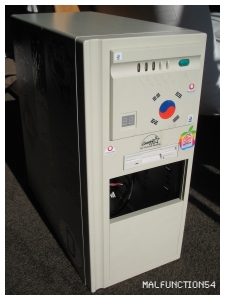
This case lasted me several years and many fun upgrades. And, many sleepless nights fearing that I’d completely screwed something up. I remember playing Doom with an audio CD playing in the background (Usually Smashing Pumpkins). This required a TSR (terminate and stay resident) driver for the CDROM drive. Oh yes, did I mention the not-so-leet Labtec speakers? “Tiny and Tinny” was their claim to fame but for the college dorm, they were enough.
Its first rejuvenation was the move to a Pentium 100 on an Asus P/I-P55TP4XE with upgradeable pipeline burst cache (which I bumped from 256KB to 512KB). This beast had 24MB of RAM, an MPEG-1 Decoder card (the docs were all in Korean, but hey, it was free). I also splurged on a 17″ Sony CPD-17SF-II Trinitron monitor which was driven by the amazing, all-powerful Number9 Imagine 128 4MB VRAM PCI graphics engine. 24-bit color at 1152×864. I also decided to get into digital artwork and purchased a Wacom 4″x5″ tablet. Sweet. I decided to upgrade the mouse to a Logitech Mouseman Serial 3-button mouse. Count ’em and weep! I also bumped up my keyboard to a Microsoft Natural (the big honkin’ original, not the Elite). It was on this machine that I first installed Solaris x86 and Linux (Redhat, then Slackware).
 Eventually, I upgraded, as the case had the worst arrangement for the drive cage. Any maintenance required disassembling the entire drive subsystem, which was a lot of work back in those days. I kept the old case lying around, and eventually revived it with old parts salvaged from discarded PCs (I believe it was a Pentium in the 150MHz range), and finally, I purchased overstock components and it lived out its last days as a 1GHz Celeron with 256MB RAM on an Epox baby AT motherboard (they actually made baby AT motherboards after the turn of the century!) The mobo/CPU/RAM live on in my current linux box, but that’s another story. As you can see, it also acquired a mass of stickers. The kana on the left side is the hiragana for my english name. I lovingly glued, X-acto knife’d out the excess, and taped over it with clear packing tape to preserve it for all time.
So, It is with misty eyes and a heart swelling with emotion that I bid a fond farewell to a trusty but finicky old friend. You will be missed.
the “wow” starts now ™
The other night, I was chatting with Ken, and he mentioned that he was considering a purchase of Vista to run under Parallels on his new MacBook Pro. Being the loving friend, I naturally went into intervention mode. A few days later, I checked in with him. This is what Vista will do to a man…
KEN: still didn’t buy the license for Vista
it turns out that parallels has this setting to disable the pc clock
so XP never thinks it has to activate itself
MF54: nice!
KEN: still might buy it anyways
just to get some experience with vista
MF54: haha
you’re a glutton for punishment
tell you what
you give me $20
I’ll kick you in the nuts a few times
should be about the same experience
KEN: if I give you more money, will you give me the “ultimate edition”?
MF54: totally
programming ruby
I’ve been hearing about Ruby for some time now (at least 4 years). It wasn’t until Ken got into it that I started thinking about it more seriously. It’s an object-oriented language and appeals to my academic side. It’s also pretty well thought out, and has some really great features (blocks!). Anyway, I’m working on building up my coding chops. It’s been a while, and right now ANSI C is my strongest language (C is a nice language, though).
Anyway, I purchased the PDF version of “Programming Ruby” and am reading through it. Good book. Well laid out and is getting me to the code ASAP. Anyway, I’ll post my progress!
My first real project is going to be a web-based prayer request app. I know, a CMS would probably give me what I need, but I want to design something I can use.
apple, schmapple…
Well, I’ve been working in an all-Apple shop for 5 months now. Overall, things are great. The problems that arise are either really simple, or involve replacing hardware. Haven’t hit too many mysteries yet.
I’d have to say that my main source of frustration is “the Apple Way®”. For instance: We received a new Macbook 2 days ago. As part of our standard operating procedure, we netinstalled an image containing all the most common apps that we use with the latest (or so we thought) version of MacOS X (10.4.8). After a quick install, we were ready to set up the new user on the machine. For some reason, the Airport card wasn’t functioning properly. Odd. A call to AppleCare, and they recommended taking the machine to a service location. In our case, the 5th Ave. Apple Store 🙂
So, later that afternoon, I trot down to the Apple Store. Wow. At 3pm, it was crowded. Anyway, after a 30 minute wait at the “Genius Bar”, I get my turn. I tell the genius that the machine isn’t recognizing the Airport card and about our imaging procedure. He says it’s probably our image. “But I just imaged 3 other Macbooks with it and it was fine.”
“Well,” he says, “You really can only install these things from the discs that came with them.”
What?! Sure enough, when he booted the machine from his clean 10.4.8 installed on a Firewire drive, the Airport card worked like a charm.
This may sound all well and good. I mean, the genius solved the problem, right? No. This sucks. What this implies is that every time there’s even a slight change in the OS, every update, every driver, etc. , we’ll need to create a new install image. Ugh. The whole point of the install images was that we’d save a lot of time when there are weird things going on with a machine, and we just want to get it back to a sane state. We’ve just lost that ability. Thanks, Apple! We really appreciate your looking out for the admins out there.
This is merely the latest in a trend of design decisions seemingly targeted at making an admin’s life a living heck. For starters, the server admin tools are a hodge-podge of GUI and non-GUI activities. While I don’t mind this so much, most Mac admins these days aren’t UNIX folk.
It’s official. As of yesterday, I have begun the disenchantment phase of my relationship with the Mac. Or, maybe the infamous “Reality Distortion Field” is just wearing off. At any rate, my feelings boil down to this: Macs are great at home. In a networked environment, they’re not so hot.
resurrection
I was getting insane amounts of comment and trackback spam. So much so, that it was taking almost an hour a day deleting comments. I didn’t have the time to upgrade my installation of WordPress, so I just took the blog down for the time being.
I finally got around to the upgrade and installed a few anti-spam measures. Hopefully, it’ll take those lousy spammers a lot longer to get through the defenses this time. As you can see, the theme has changed. When I get a chance, I’ll update that, too.
